

VisionService、TextToSpeechService 以及 AudioPlayerService 都是 Angular 服務,它們引入了龐大的依賴項目,例如 Firebase AppCheck 和 Firebase AI Logic。此外,在觸發任何操作之前,這些服務都完全處於閒置狀態。使用 injectAsync 能確保瀏覽器僅在使用者執行操作(例如產生圖片分析與合成語音)時才下載它們。
我們在 TextToSpeechViewService 中將這兩個 inject() 呼叫遷移至 injectAsync()。
這非常適合,因為這些是隨選服務,僅在使用者打算合成語音並播放音訊時才會使用。
遷移前:
readonly speechService = inject(TextToSpeechService);

readonly audioPlayerService = inject(AudioPlayerService);
遷移後:
readonly #asyncSpeechService = injectAsync(() =>
    import('@/core/services/text-to-speech.service').then((m) => m.TextToSpeechService),
);

readonly #asyncAudioPlayerService = injectAsync(() =>
    import('@/core/services/audio-player.service').then((m) => m.AudioPlayerService),
);
@Injectable()
export class TextToSpeechViewService {
    readonly #asyncSpeechService = injectAsync(() =>
        import('@/core/services/text-to-speech.service').then((m) => m.TextToSpeechService),
    );

    readonly #asyncAudioPlayerService = injectAsync(() =>
        import('@/core/services/audio-player.service').then((m) => m.AudioPlayerService),
    );

    readonly #audioUrl = signal<string | undefined>(undefined);
    readonly #loadingMode = signal<GenerateSpeechMode | 'idle'>('idle');

    audioUrl = this.#audioUrl.asReadonly();

    /* ...other methods... */

    private async handleSync(promptArgs: FactConfig) {
        const speechService = await this.#asyncSpeechService();
        const blob = await speechService.synthesize({ text: promptArgs.prompt, voice: promptArgs.voice });
        this.setAudioUrl(blob);
    }

    private async consumeStream(
        stream: AsyncGenerator<AudioStreamChunk>,
        collectBlob: boolean,
        abortSignal: AbortSignal,
    ): Promise<Blob | undefined> {
        const audioPlayer = await this.#asyncAudioPlayerService();
        const pcmChunks: Uint8Array[] = [];
        let mimeType = '';
        let isInitialized = false;

        for await (const chunk of stream) {
            if (abortSignal.aborted) {
                return undefined;
            }

            if (!isInitialized) {
                audioPlayer.initialize(chunk.sampleRate, 1);
                isInitialized = true;
            }
            audioPlayer.processChunk(chunk.decodedData);

            if (collectBlob) {
                pcmChunks.push(chunk.decodedData);
                if (!mimeType) {
                    mimeType = chunk.mimeType;
                }
            }
        }

        return collectBlob && pcmChunks.length > 0 ? toWavBlob(pcmChunks, mimeType) : undefined;
    }

    private async handleStream({ prompt, voice, shouldWait = false }: FactConfig) {
        const abortController = new AbortController();
        const unregisteredFn = this.#destroyRef$.onDestroy(() => abortController.abort());

        this.#playbackRate.set(shouldWait ? 1 : this.calculateRandomPlaybackRate());

        const speechService = await this.#asyncSpeechService();
        const stream = speechService.synthesizeStream({ text: prompt, voice });
        const finalBlob = await this.consumeStream(stream, shouldWait, abortController.signal);

        if (shouldWait && !abortController.signal.aborted) {
            const audioPlayerService = await this.#asyncAudioPlayerService();
            await audioPlayerService.awaitPlaybackComplete();
            this.setAudioUrl(finalBlob);
        }
    }
}
在 handleSync 與 handleStream 中,我們 await this.#asyncSpeechService() 以取得 TextToSpeechService. 的執行個體。在 handleSync 中,呼叫 synthesize 方法以針對指定的文字和語音名稱產生語音。在 handleStream 中,則呼叫 synthesizeStream 方法以串流傳輸音訊並分塊接收資料。
在 consumeStream 中,我們 await this.#asyncAudioPlayerService() 以取得 AudioPlayerService 的執行個體。音訊播放器會處理分塊資料,並利用 Web Audio API 以特定的播放速率與開始時間播放音訊。
我們在 AnalyzerPanelComponent 中將 inject() 呼叫遷移至 injectAsync()。
這非常合適,因為該服務只有在使用者點擊 Generate Description 按鈕觸發圖片分析時才需要。
遷移前:
visionService = inject(VisionService);
遷移後:
#asyncVisionService = injectAsync(() => import('@/core/services/vision.service').then((m) => m.VisionService));
@Component({
  selector: 'app-analyzer-panel',
  imports: [PhotoPanel, AltTextPanel],
  templateUrl: './analyzer-panel.component.html',
  styleUrl: './analyzer-panel.component.css',
})
export class AnalyzerPanelComponent {
  #asyncVisionService = injectAsync(() => import('@/core/services/vision.service').then((m) => m.VisionService));

  analysis = model<ImageAnalysisResponse | undefined>(undefined);

  async handleGenerateClick(file: File | undef  ined) {
    if (!file) {
      return;
    }

    this.analysis.set(undefined);
    const service = await this.#asyncVisionService();
    const results = await service.generateAltText(file);
    this.analysis.set(results);
  }
}
在 handleGenerateClick 中,我們 await this.#asyncVisionService() 以取得 VisionService 的執行個體。接著,呼叫 generateAltText 方法以取得回應。
HTML 範本沒有任何變更,且元件的行為保持不變。
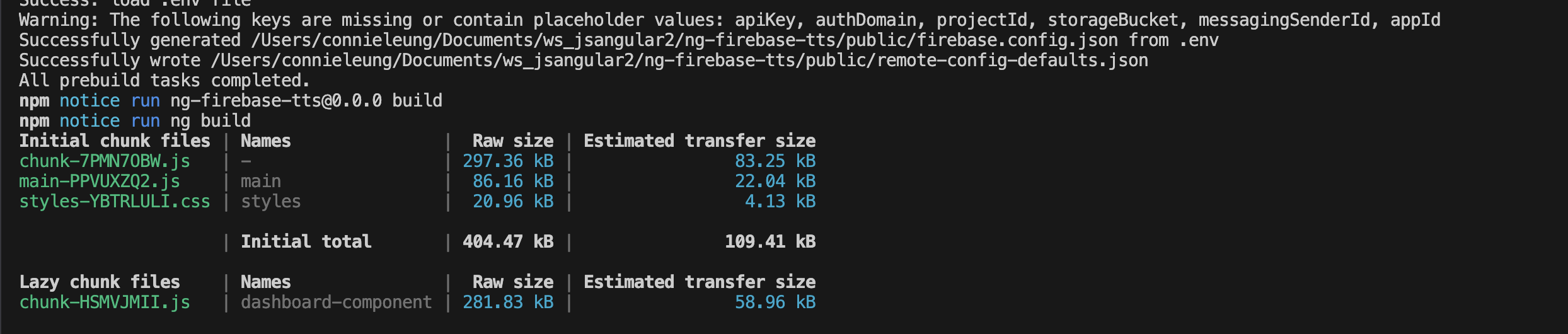
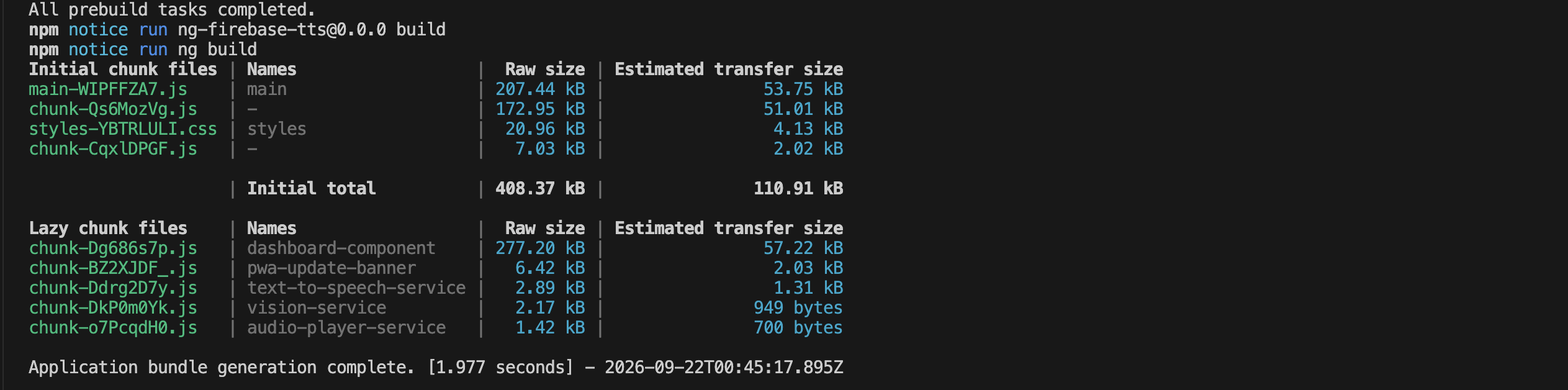
雖然 main.js 從 86 kB 增加到 207 kB,但初始打包總大小僅稍微增加到 110 kB。這是因為 main.js 與共用分塊之間共用依賴項目的重新分配所致。
透過套用 injectAsync(),VisionService、TextToSpeechService 以及 AudioPlayerService 被拆分為獨立的延遲載入分塊並按需擷取。例如,當使用者點擊 Generate Description 按鈕觸發圖片分析時,才會下載 VisionService。而 TextToSpeechService 與 AudioPlayerService 則是在使用者點擊按鈕進行語音合成並播放音訊時載入。
此外,細粒度拆分大幅改善了瀏覽器快取機制,因為修改這些服務中的任何一個都不會使 dashboard-component 打包檔案失效,進而避免回訪使用者不必要地重新下載整個打包檔案。
我請 Gemini 分析程式碼庫,尋找從 inject() 遷移至 injectAsync() 的機會:
/grill-with-docs do you find inject that can replace with injectAsync
在檢視原始檔案後,Gemini 得出結論:剩餘的 inject() 都不適合遷移至 injectAsync()。
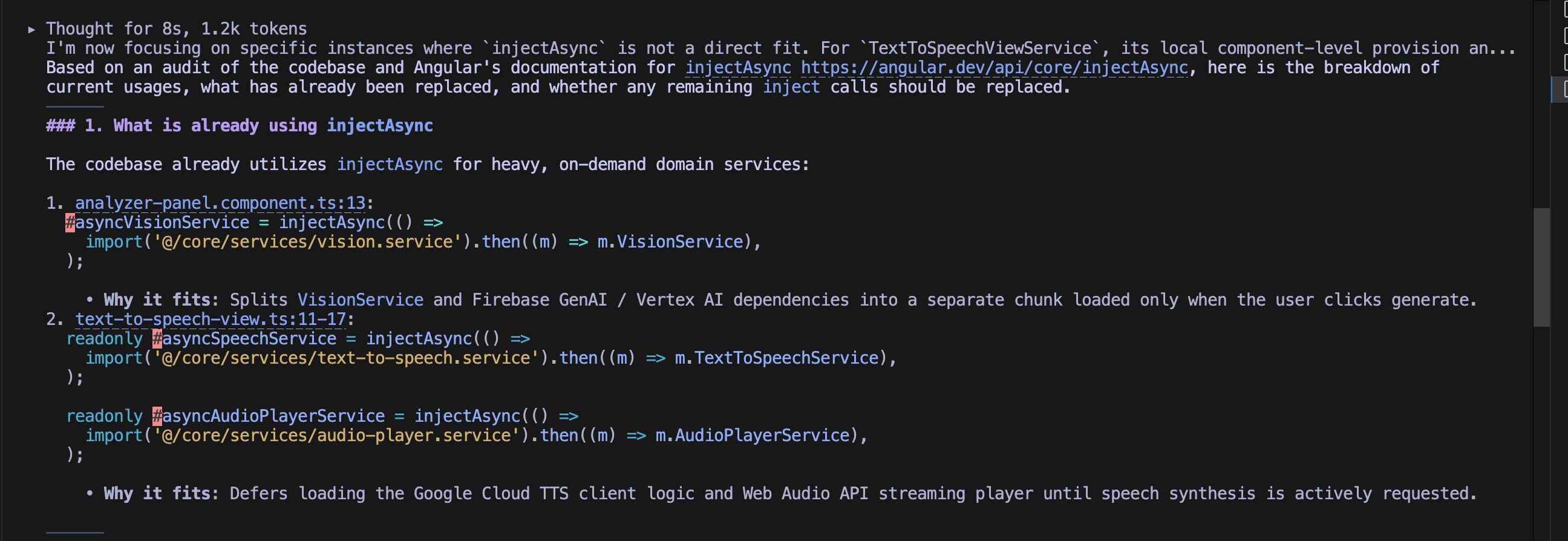
Gemini 解釋了現有 injectAsync() 的使用方式非常合理。
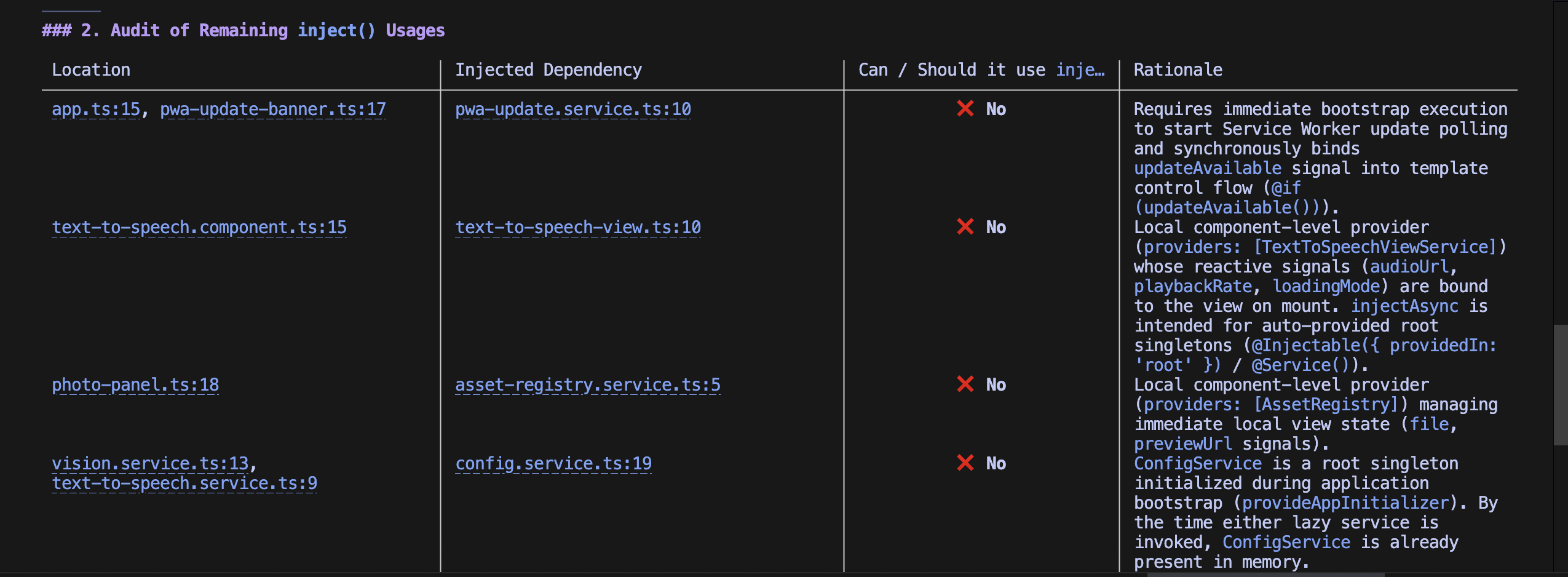
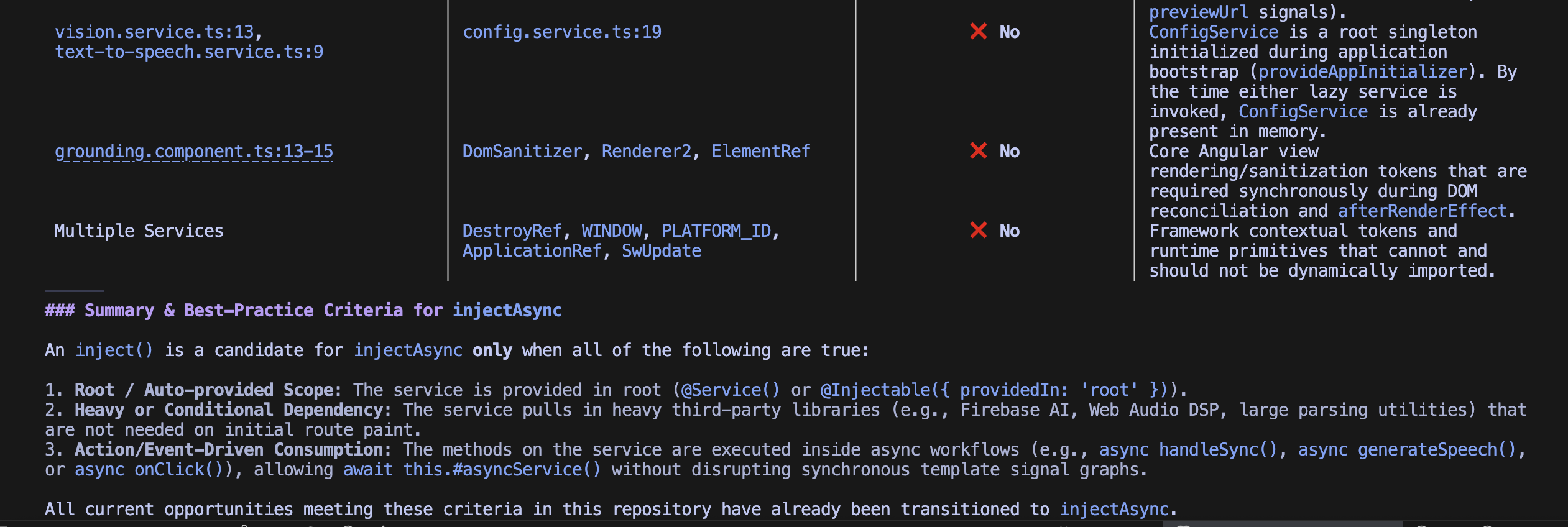
其餘的 inject() 呼叫皆不適合遷移至 injectAsync()。在所有符合資格的服務都已完成遷移後,我們的延遲載入重構便大功告成。
今天就先到這裡。明天我們將介紹 Angular 的 @defer 區塊,以實現細粒度的元件級程式碼分割。目前,每個元件都被打包成龐大的單體式 dashboard-component 分塊。我們可以延遲載入替代文字、標籤清單以及冷知識元件,直到 Firebase AI Logic 完成圖片分析為止。
Angular 中的 InjectAsync
Angular 22 中的延遲載入服務


 iThome鐵人賽
 看影片追技術